A ready-made AI engine to embed in your software (100% on-premise).
We deliver the complete aamp engine (single binary), which you plug into your platform through an API in no time. That lets you launch paid AI services for your customers faster, without rebuilding your existing system.
Five planes, one console.
Agents, ingresses and app schedules.

The agent runs the conversation and decides which tool to reach for. Repeatable logic goes into Python scripts that the agent calls, and on top of them you build form-based apps run by users or by the scheduler. Every change goes to a draft first and only takes effect once you publish a new version.
- —Persistent conversation history across chat, widget and API
- —Cron schedules for apps, with run history
- —Agent and script versions with a change diff
Every run in its own microVM.
Python scripts, document indexing and browser work run in disposable Firecracker microVMs. The machine starts with no network access, and you grant access explicitly by listing allowed addresses. When the run finishes, is stopped or times out, the machine is deleted.
- —One microVM per run
- —Network only to the IPs and ranges you list
- —Timeout and a Stop button for every run
Tool profiles and integrations under host control.
Tools such as web search, browser control or page reading are configured once as profiles and attached to the agents you choose. Integrations, such as SSH, are used by scripts. The agent receives a description of the tool, not a password or key, so the scope of its access is your decision.
- —Reusable tool profiles, with change history
- —SSH, TypeSafe and Jina Reader integrations for scripts
- —Keys and passwords encrypted on the server
Network filters, firewall evaluation, sandbox rules.
All guest network traffic goes through a host-controlled proxy. Domain rules support default-allow or default-deny, and host.internal exposes only the routes you approve.
host.internal exposes only the routes you approve.- —Two-sided LLM safety firewalls
- —Outbound traffic default-allow or default-deny
- —Temporary, scoped credentials for every call
Centralised logs and usage records.
Fourteen log domains record token accounting, firewall decisions, proxy traffic and document-level retrieval. They are produced as a side effect of the system running, not as a separate integration project.
- —Queryable per resource
- —Token usage per agent and model
- —Retrieval recorded at document level
One binary, no external services
A single Go binary with no cgo, message broker or external cache. Deploys on a Linux host with /dev/kvm.
All state in a local SQLite database
SQLite plus local files. A backup is one file and two directories; migrating means copying them.
Risky work in Firecracker microVMs
Firecracker microVMs for risky work: browser control, document rendering, RAG indexing.
Any OpenAI-compatible model
Any OpenAI-compatible endpoint: vLLM, Ollama, LocalAI, TGI or a hosted frontier model provider.
Company data, read-only
DataLake datasets on DuckDB and Parquet: versioned, classified and queried by agents read-only.
Scripts become apps for the team
Python scripts become form-based apps and dashboards for users without admin rights. The cron scheduler runs them at set times.
Roles, per-agent access and safeguards on every interface
Two roles with access granted per agent, plus input and output safeguards on every interface.
14 log domains, no separate project
14 log domains: token accounting, firewall decisions, proxy traffic and document-level retrieval.
You manage agents, safeguards and logs from one panel. Each plane has its own scope and its own event record, so it is easy to see what worked and why.
Hard compliance with GDPR and the EU AI Act.
Evaluated before the agent sees it.
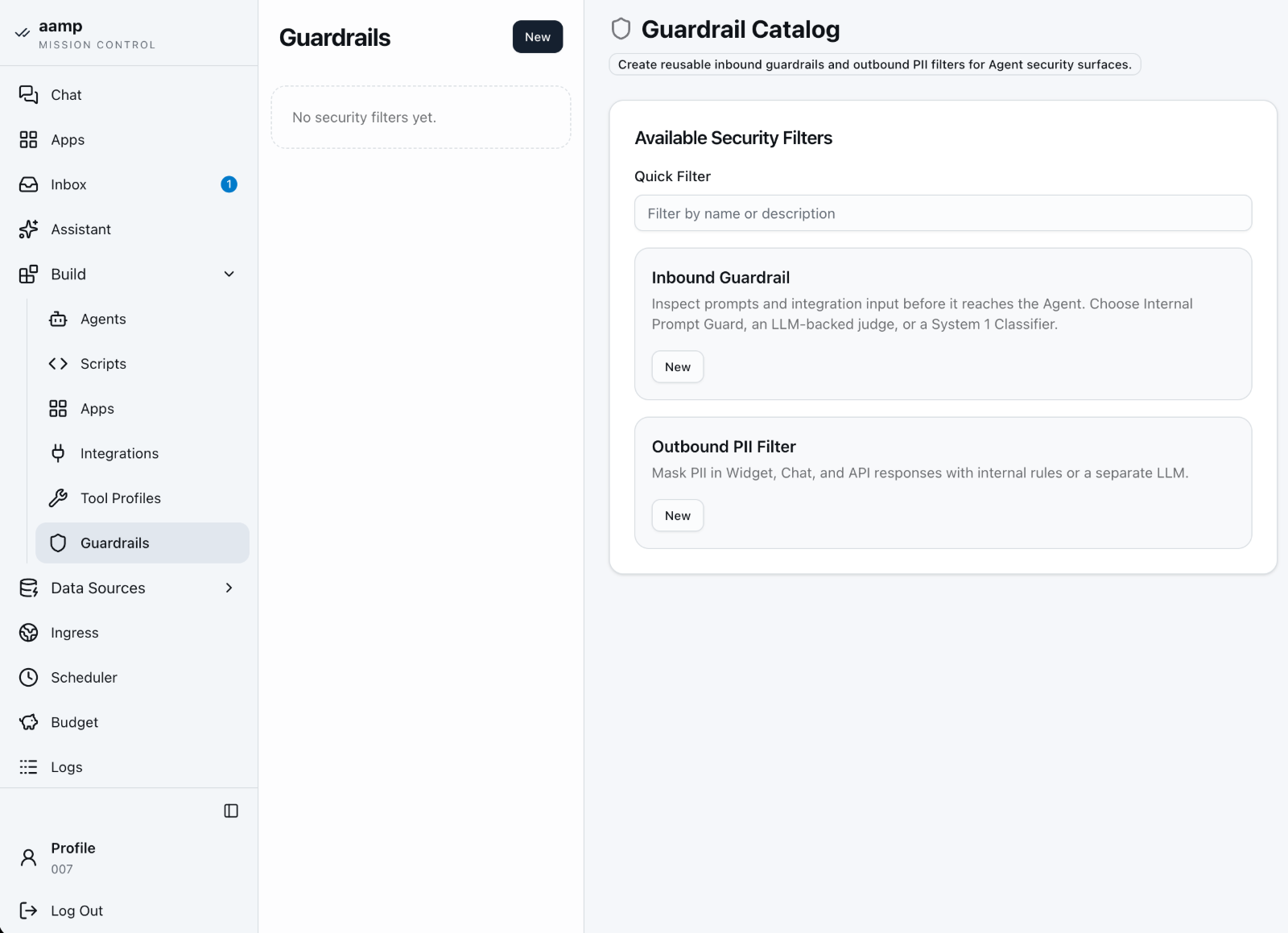
The safeguard runs before the user's message reaches the agent's model. Safe content passes through; unsafe content stops the request and returns the refusal message you set. A failed evaluation does not pass silently: the mechanism blocks by default.
Safeguards are reusable policies attached per interface: internal chat, WebWidget, API and the OpenAI-compatible endpoint, plus content processing, which checks untrusted tool output before it returns to the loop.
- —Internal — a deterministic prompt-injection scanner and a locally hosted Llama Prompt Guard 2 classifier. No external inference call.
- —Generic Judge — your policy in natural language, evaluated by any OpenAI-compatible model.
- —Llama Guard i ShieldGemma — for deployments that already use a compatible safety model.
The built-in classifier runs on the server's CPU, with no graphics card and no internet connection. Every decision is logged with its reasoning, category and risk score.
Data provenance without a separate documentation project.
What went into the prompt, what was retrieved, what the model returned, which tools ran and what it cost, all recorded as a side effect of the system running.
Transparency obligations under Article 50 apply from 2 August 2026. Obligations for Annex III high-risk systems apply by December 2027, which means you are building architecture, not buying a patch.
Underneath it all, two roles. Administrator configures the system and sees every module. User has access only to explicitly assigned agents and Apps.
Decisions are enforced on the server for every protected route, not by hiding buttons. Changing permissions invalidates that user's sessions, the last active administrator cannot be demoted or removed, and every change writes an authorisation record with the subject, action, target and result.
Everything sensitive stays on the host.
- —Provider API keys and integration secrets stay on the host
- —Secrets encrypted at rest, protected by a master key
- —The host UI uses session authentication and CSRF protection for browser changes
- —Orchestration, policy decisions, tool wiring and audit logging happen on the host
- —DataLake datasets are classified and become bounded, read-only query tools: no raw data export, no unrestricted SQL
Scripts and tools run in sealed microVMs.
- —Every script run in its own Firecracker microVM
- —No network access until you grant it explicitly
- —The machine is deleted when the run finishes, is stopped or times out
- —Untrusted files and pages are opened outside the host system
One way out, and you control it.
- —All guest network traffic goes through a host-controlled proxy
- —Domain rules in default-allow or default-deny mode
- —
host.internalexposes only the routes you approve - —Scripts use keys stored on the host without revealing them
Redacted before it reaches the recipient.
The output filter runs after the response is generated and before it is delivered, replacing detected identifiers with explicit markers, [REDACTED_EMAIL], [REDACTED_PERSON_NAME] while keeping the meaning and structure of the response.
[REDACTED_EMAIL], [REDACTED_PERSON_NAME] while keeping the meaning and structure of the response.With the filter active, the response is buffered rather than streamed, so no unfiltered fragment gets out early. Only the cleaned text is delivered, stored and audited. If the filter fails, delivery is blocked.
- —A deterministic first pass with format and checksum validation: email, IBAN, PESEL, US SSN, card numbers verified with the Luhn algorithm, phone, IPv4
- —Then the multilingual XLM-RoBERTa token classifier for all 24 official EU languages: names, addresses and organisation names
- —Runs locally, with no network access, and does not store the content of the messages it checks
- —Or hand semantic redaction to a configured model, if the provider's data residency terms suit you
Personal-data filtering is a risk-reduction measure, not a certification. Detection quality depends on language, context and input, and the mechanism should work alongside data minimisation, access control and a retention policy.
Two filters protect every conversation: the input filter stops attempts to hijack the agent (prompt injection) before the content reaches the model, and the output filter masks personal data such as national ID or bank account numbers. Roles and access granted to specific agents and knowledge bases decide who can use what. Keys, rules and logs stay on your server.
Predictable costs with no hidden fees (0% Step Tax).
Know before the finance team does.

Input, cached and output tokens for any date range, with a daily chart and a breakdown by model. You can narrow the view to selected agents, ingresses and knowledge bases, so you can see which use case is expensive.
A monthly limit with a forecast to month end.
You set a limit on input tokens, output tokens and number of requests for the whole installation or a chosen scope. The panel shows usage, a cumulative chart with the limit line and a forecast based on usage so far, next to a comparison with the previous month.
Costs outside agent conversations are counted too.
A separate panel collects usage of personal-data filters and input filters, the script assistant, speech transcription, agents called by scripts and embeddings. For each you see the number of calls, errors, processing time and tokens.
Keep frontier models where they earn their place.
Send the routine majority of traffic to small or local models, and keep frontier capability for the share of tasks that justifies it. Reported combined savings from tiered routing range from 40 to 80 percent compared with running on frontier models alone.
Agent loops are where budgets disappear.
Each agent has a limit on model–tool rounds, after which it stops, and automatic context compaction once a set threshold is exceeded. A long conversation does not grow forever.
Set the limit, don't discover it on the invoice.
Reasoning tokens are billed as output. For each agent you set the reasoning level and the maximum number of response tokens, with a default for the whole installation.
Many platforms charge for every step an agent takes. With aamp you pay for the completed task, however many steps it needed. You connect models on your own API keys with no middleman margin (BYOK), or run them locally.
Any model. Local or hosted. A one-line configuration change.
Models are assigned per agent, not globally.
Provider and model are assigned to the agent and to host functions, not to one global setting. Data classification decides which model an agent may call, and the same assignment governs which agents can query a DataLake dataset or Data Product.
Local open-weight models, first class.
Run open-weight models on your own hardware next to hosted frontier models, behind one policy boundary. Any OpenAI-compatible endpoint: vLLM, Ollama, LocalAI or TGI.
Designed up front, not improvised at 2 a.m.
A second provider is a configured fallback, not an incident you improvise your way through during an outage.
aamp works with any OpenAI-compatible model, in the cloud and locally, for example through Ollama or vLLM. Open models now match closed ones on many tasks, so full privacy does not mean worse results.
Agents, apps and data in one place.
Employees talk to agents in one window.
Each user sees only the agents they have been given access to. Conversations, attachments and history stay on your server, and the administrator decides who uses which agent.
Ready-made apps for the whole team.
Published dashboards are open to every signed-in user, including those without admin rights. Each tile has its own form, run button, status and result. One failed tile does not block the others, and two users’ results never mix.
- —Run manually or automatically when the dashboard opens
- —An open window keeps its version, even after a new release
- —Only administrators change an app, in the builder
The agent delivers results and notifications itself.
Finished reports, alerts and responses land in the recipient's inbox, with an unread counter in the menu. Nobody has to ask the agent about the status of a task.
An assistant that configures the platform with you.
An administrator describes the goal and the assistant prepares an agent or an app: it picks the model, integrations and tools, writes the script, creates knowledge sources and a base, runs a test, reads the logs and fixes errors. Changes to network access, publishing, schedules and runs of published versions wait for your approval in the conversation.
- —Private administrator conversations with every tool call and change on record
- —Diff and undo for every draft edit, Stop for every turn
- —Read-only view of usage, budgets, queues and logs
The agent is your configuration, not a vendor's service.
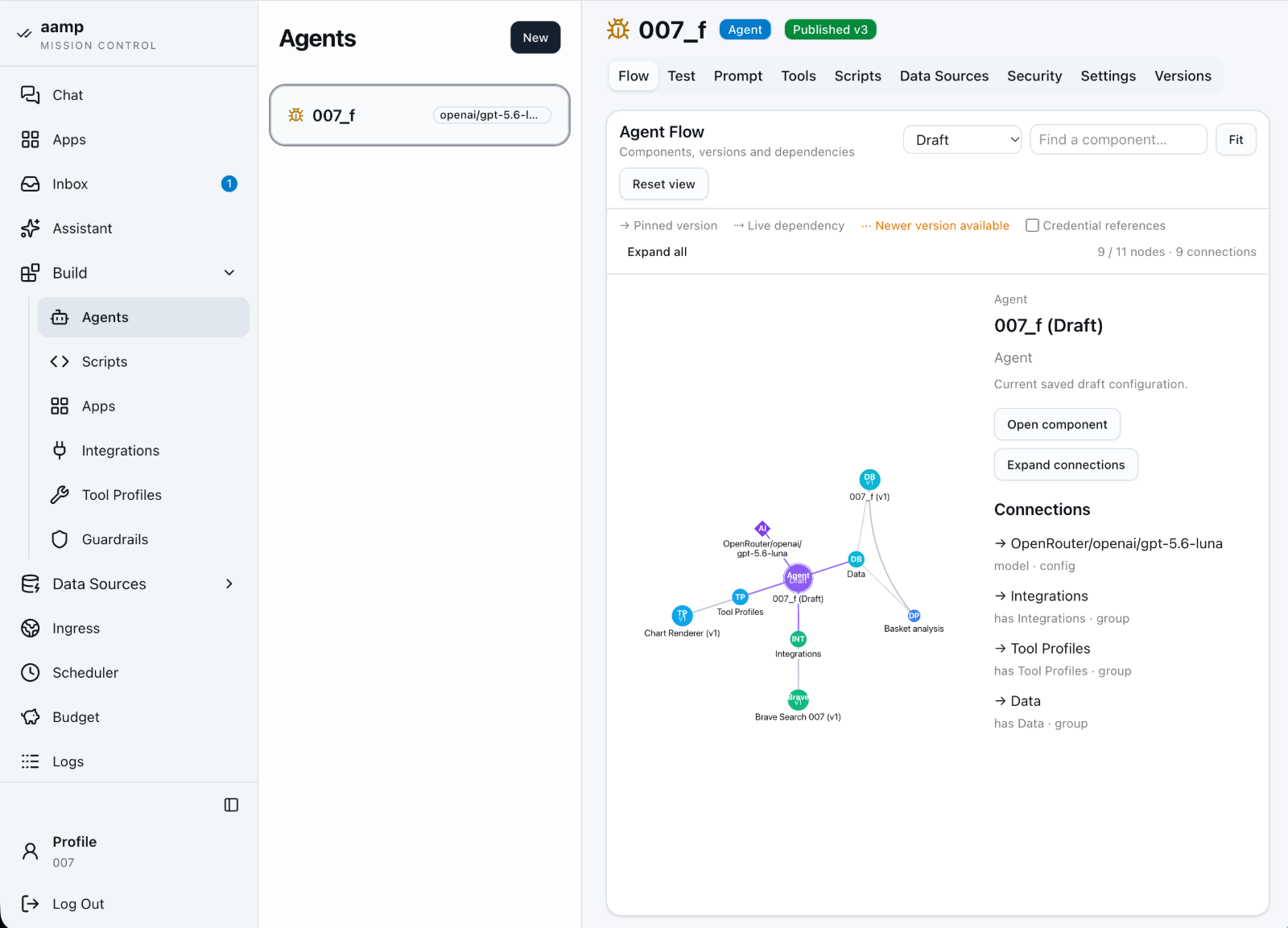
Each agent has its own model, instructions, tools, scripts and access to selected data sources. You save changes as a draft and publish them as a new version, and the Agent Flow view shows every dependency on one graph.
Isolated Python, run manually, by an agent or through an app.
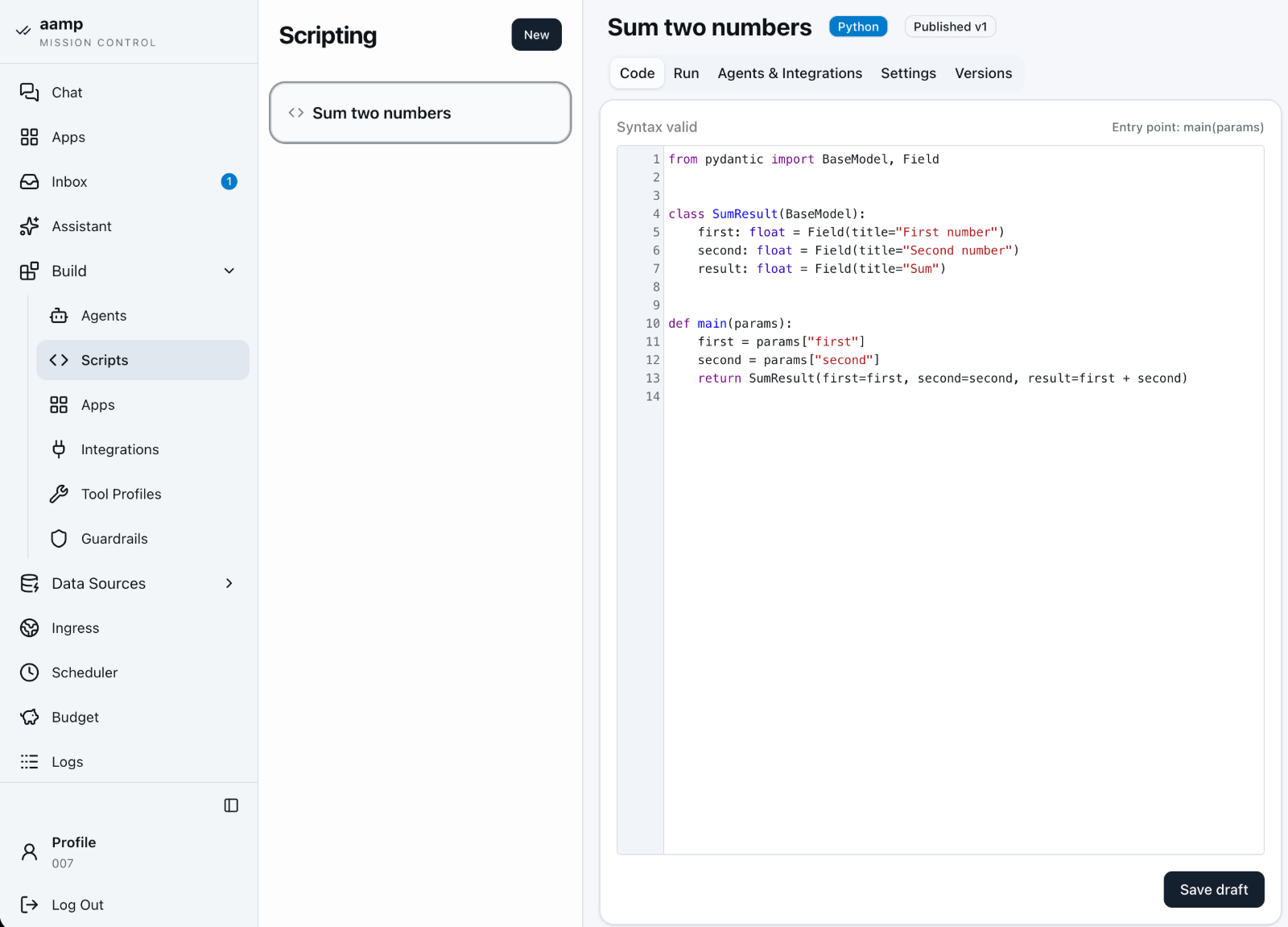
You write and test code in the editor, with run history and a console. A script can call a published agent and get a structured result back. Every run happens in a disposable microVM, and in the builder a script becomes a form-based app that can also run on a schedule.
Turn a script into an app, and apps into a dashboard.
A process wraps a published script in a form and a readable result view, with no frontend to write. A dashboard arranges many such widgets on a 12-column grid: drag, resize, set default parameters and the run mode. Processes and dashboards have drafts, releases and version history.
- —Version chain dashboard → process → script, with no silent updates
- —Preview and layout editing never execute code
- —On a phone the dashboard stacks into one column
Connections to external systems under host control.
Integrations such as SSH, TypeSafe or Jina Reader are configured once and attached to scripts. Tool profiles, such as web search or browser control, are attached to agents. Keys stay encrypted on the server.
Documents and websites as versioned knowledge.
A source can be files, a list of links or an entire website. A “rolling” base always uses the current content, while a “strict” base works on a frozen, published version. The agent answers with a reference to the source.
Company tables the agent queries read-only.
You upload CSV or XLSX files as versioned datasets. On top of them you build analytical products, such as recommendations of products bought together. The agent sees only the published version.
Describe your company's concepts and relationships before connecting data.
On a diagram you define types, such as Customer and Order, their properties and relationships. An AI assistant helps build the model, and every publication creates a version used by the connected agents.
Expose the agent through an API or a widget on your site.
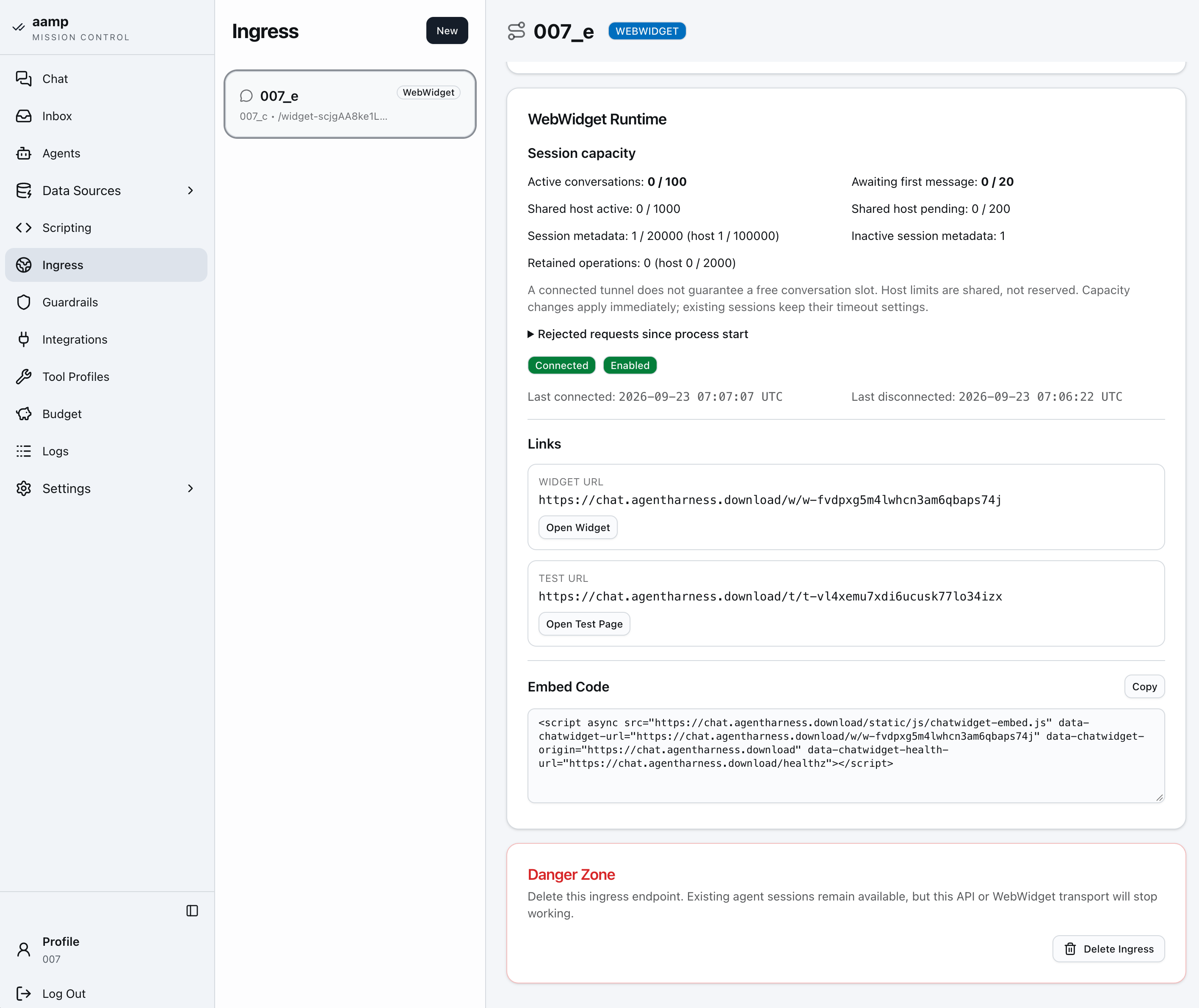
An ingress connects the agent to a channel: an API or a WebWidget embedded with one snippet of code. Each ingress has its own session limits, test address and connection status.
Apps that run on a schedule.
A task combines a published app, its parameters and a cron expression with a timezone. You can also describe the schedule in plain words, such as “every Monday at 10:00”, and the assistant fills in the form. Missed times coalesce into one run, and overlapping executions of the same task are skipped.
- —Run history linking each execution to its logs
- —Run now without moving the next scheduled time
- —Pause a task without deleting its configuration
All host configuration in one place.
Settings cover four areas: general, model providers, users and secrets. Under general you choose the default model and the assistant model, set embeddings and document chunking, Firecracker microVM parameters, WebWidget limits and the background job queue, plus the local protective models: Prompt Guard, the PII filter and the token counter.
- —OpenAI-compatible providers for generation, embeddings, reranking and transcription
- —Users with the administrator or user role and access granted per agent and App
- —License with automatic renewal, and system status: storage and active runtimes
Modules in the order you see them in the console: everyday work with agents and apps, building, data sources, and operations and settings.
Every event recorded, queryable per resource.
Insight into the agent, straight from the conversation.
Each response shows input and output tokens and the cost. The Agent button opens a read-only summary: provider, model, context window, compaction threshold, tool round limit, system prompt and connected tools. The user knows which agent they are talking to, and the administrator does not have to dig through logs.
Every conversation as its own session.
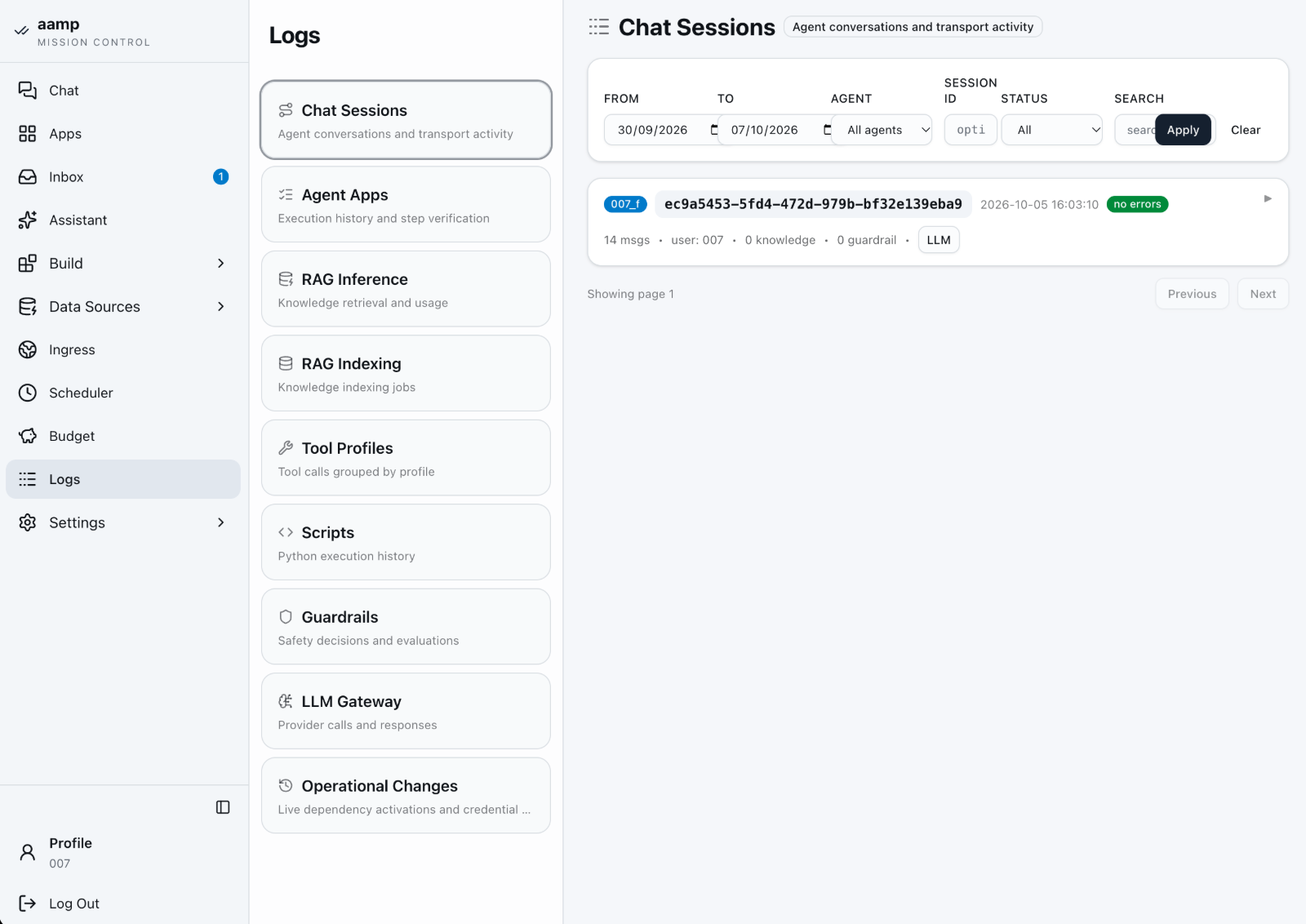
You see which agent and which ingress handled the conversation, how many messages there were, how many knowledge bases were used and whether safeguards triggered. A session with an error expands down to a single step.
What the agent searched for and read.
Every knowledge base search and every document fragment read is recorded with the time, session and ingress. It is easy to check what an answer was based on.
The status of every knowledge base indexing job.
For each job you see the knowledge base, status, number of source files, processed chunks and documents, the model used and any error.
Tool calls grouped by profile.
Web search, browser or page reading: every use of a tool by the agent is recorded under the profile it came from, with its arguments and result.
Python script run history.
Each run records its input parameters, console output, duration and status. This covers manual runs, scheduled runs and runs called by an agent.
Input and output filter decisions.
A record of every evaluation: which filter triggered, on which channel, and whether the content was passed, blocked or masked.
Every model request with tokens and timing.
Provider, model, input, cached and output tokens, response time and a content preview. You can also see whether the request came from an ingress, a knowledge base or a host function.
Changes that take effect without publishing a new version.
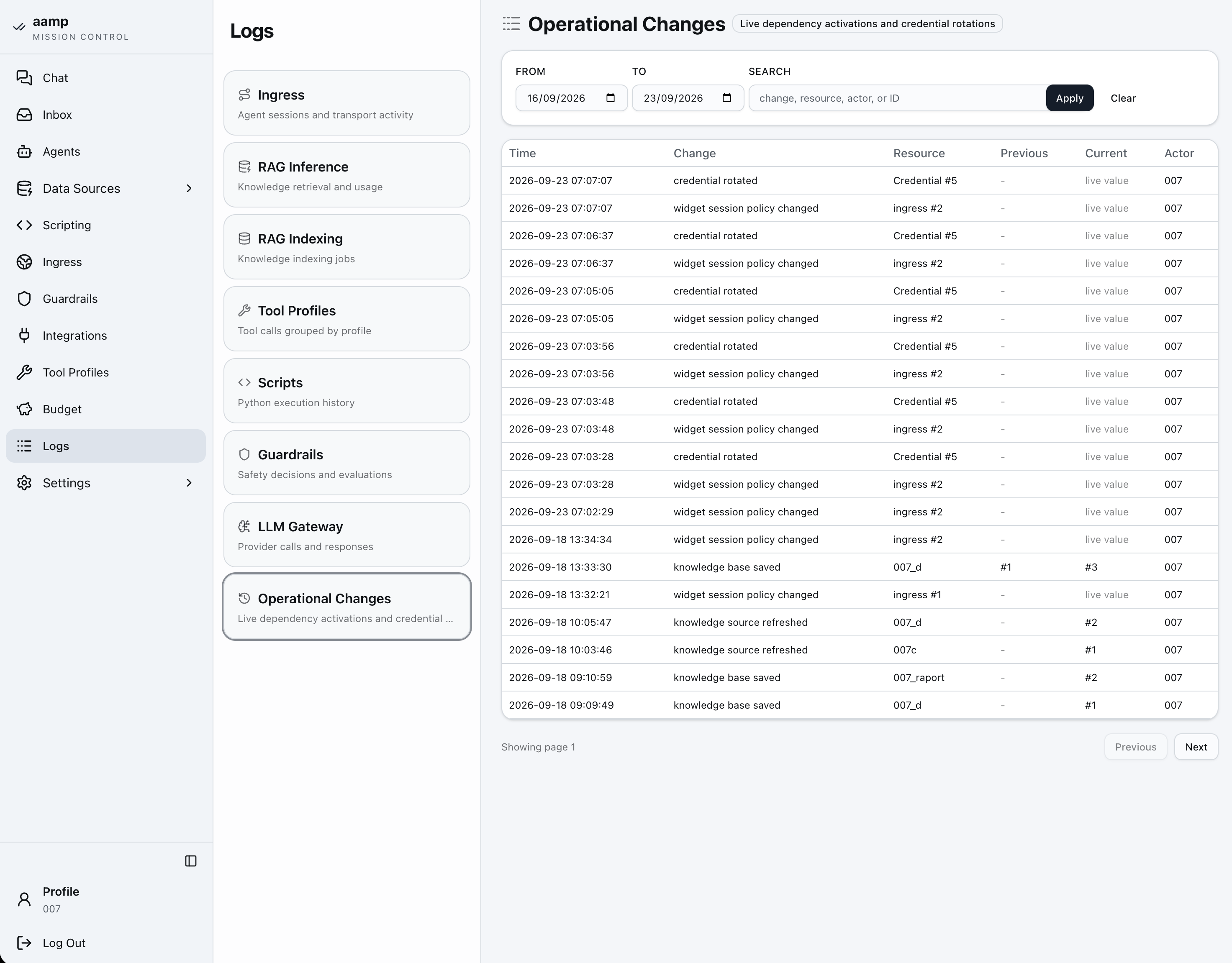
Key rotations, knowledge base refreshes and widget limit changes are recorded with the previous value, the current value and the author of the change.
Logs are split into areas, with filters for date, agent, session and status. Token usage is summarised separately in the Budget section.
An architecture that doesn't weigh on your IT team.
- A Linux host with KVM (
/dev/kvm) - Nested virtualisation when installing in a private cloud
- A 32-byte master key for secrets
- Dedicated on-premise servers
- Private clouds with virtualisation
- Isolated lab and staging environments
- Internal platform environments where data residency matters
We state the requirements plainly and up front. A failed install is a lost customer; an honest list of prerequisites is not.